

Surfer is powerful software for geospatial analysis, data interpolation, 2D/3D map generation, and surface modeling. With intuitive tools and advanced automation features, it is the ideal choice for professionals who need to communicate complex information clearly and reliably.
Official Partner:

Trusted by over 100,000 scientists and engineers worldwide, Surfer simplifies the transformation of complex geospatial data sets into accurate 2D and 3D models.
Key Features
High-precision modeling
More than 13 interpolation methods (Kriging, Co-Kriging, IDW, among others) with anisotropy options, variograms, and geological constraints.Dynamic 2D and 3D maps
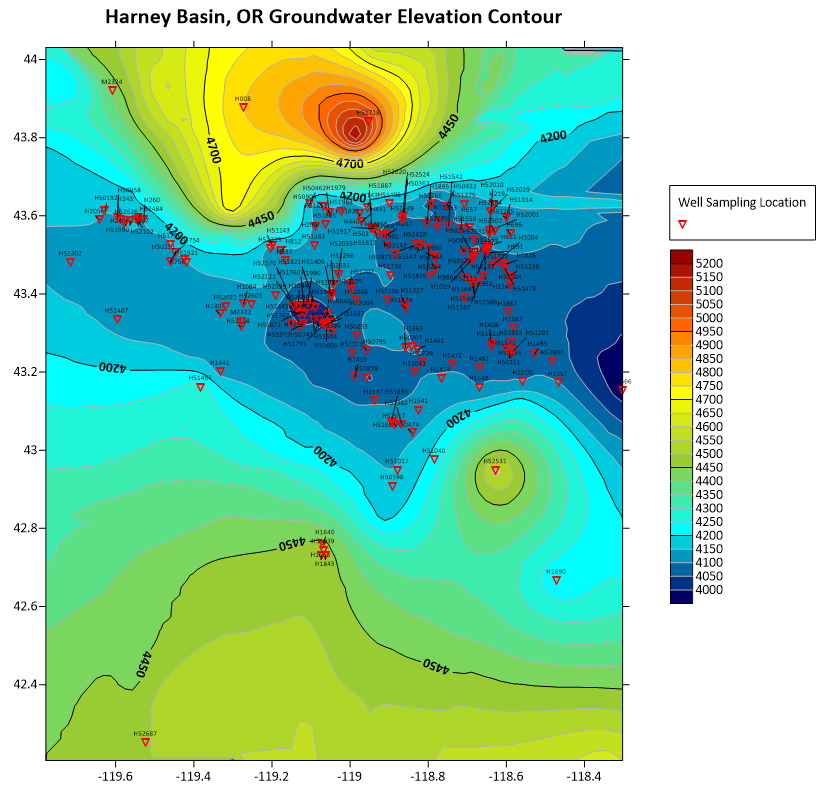
Creation of contour maps, colored surfaces, relief models, watersheds, profiles, and point clouds, with full visualization control.Advanced analyses
Volumetric calculations, mathematical operations between grids, and spatial analyses to support more confident decisions.Wide compatibility
Import and export in multiple formats (SHP, DXF, GeoTIFF, XLSX, PDF, VTK, GRD), ensuring integration with different workflows.Process automation
Scripts with Scripter and ActiveX to automate repetitive flows, saving time and increasing consistency.Integrated cartographic base
Direct integration with Google Maps for use as a base layer, facilitating spatial context in your projects.
Create an immersive 2D/3D model in less than 2 minutes!
More than software,
a technical partnership
Water Services and Technologies is Surfer’s official representative in Brazil. More than just providing the license, we offer:
- Specialized technical support in geosciences and modeling.
- Customized training for teams.
- Practical integration of Surfer into mining, environmental, and water management projects.
Useful Information
Surfer is a Windows based, desktop software.
For Mac, Linux, or Unix users, Surfer can be run using your preferred Windows emulator. We recommend testing the functionality with our trial version before purchasing.
Minimum requirements
- Windows 10, 11 and higher
- 64-bit operating system
- 1024×768 or higher monitor resolution with minimum 16-bit color depth
- At least 1GB free hard disk space. 500GB or larger hard drive with 25% disk space available recommended
- 2GB RAM minimum, 16GB RAM recommended
- .NET Framework 4.8
3D View requirements:
- Graphics card with OpenGL v3.2 or later
- Dedicated graphics card (e.g. NVIDIA, AMD) highly recommended
- Windows emulators, such as VMs and Parallels for Mac, may not support all the required features for viewing data in the 3D view
Fine Tuning Surfer Performance
- Issues with 3D View features may be corrected by upgrading to the latest graphics drivers.
- Many heavily computational operations, including gridding and contouring, are multi-threaded and processor reliant. A faster processor will improve Surfer’s performance.
- For processing very large data files, such as LiDAR or some vector data files, fast and large RAM storage capacity is recommended.
- Click the File | Options command and on the General page, set the Max number of processors to use all processor cores.
- For improved performance, you can disable Save auto recovery information (File | Options | General). However, disabling this feature means you will lose any unsaved work if the program closes unexpectedly. Auto-recovery is highly recommended to protect your data.
The most recent version of Surfer is version 29.3.307 released on June 28, 2025.
Packed with new features and improvements, these updates are available to users with an active software subscription or software maintenance.
Explore the latest release: New Features in Surfer
The most recent version of Surfer Beta is version 30.0.188 released on July 1, 2025. Surfer Beta is available to users with an active subscription or maintenance.
We provide full support to only the current versions of Surfer and Surfer Beta. Please see the Golden Software Support Policy for more details.
Single-user license: This license may be used by a single individual. They are ideal for a single user, an individual who needs access to Surfer at any point, or those who frequently visit client sites or are away from the office.
Concurrent-use license: Also called a “network” or “floating” license, this license is tied to a network and Surfer can be installed on as many client machines as desired. The number of users who can use Surfer at a given time is limited by the number of seats purchased.
Both license options are available in a subscription or perpetual plus maintenance model.
Subscription license: Access to the latest version of Surfer for either a monthly or annual term with automatic renewal.
Perpetual license: A one-time purchase that gives you lifelong access to Surfer. The first year of software maintenance is included and at the end of the year, you must renew software maintenance to continue receiving the latest Surfer releases.
For further information on licensing, review the Licensing articles or our End User License Agreement.
Need help?
Contact us now to discuss your unique requirements and let our experts guide you to the perfect solution.